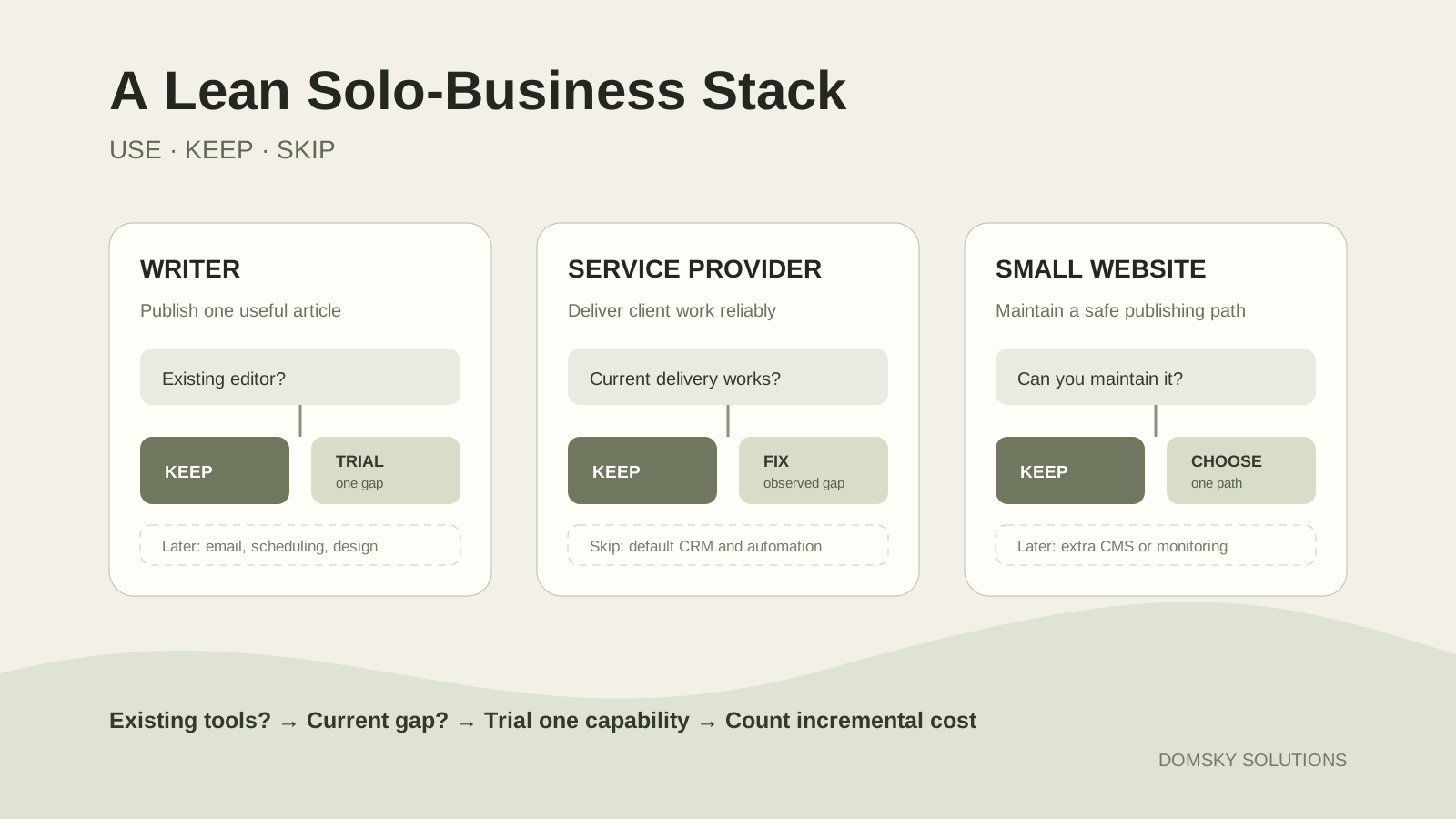
A writer needs a reliable place to research, draft and edit. A service provider first needs to deliver work and communicate with clients. A small-site builder needs a maintainable publishing path. Buying the same ten tools for all three situations creates cost and complexity before it creates value.
- What work do you perform every week?
- Which tools you already have complete that work well enough?
- What specific capability is still missing?
If you cannot name the missing capability, do not add a subscription yet. If AI is new to you, use the Prompt Builder to define one bounded first task before choosing a paid plan.
Start with the work, not the tool list
A software category becomes necessary only when it serves a current job. Use outcomes such as drafting one useful article, delivering client work, publishing five website pages, collecting subscribers with consent or tracking renewals.
| Status | Meaning | Decision |
|---|---|---|
| Covered | An existing tool completes the job reliably | Keep the existing path |
| Partly covered | The job works, but a repeated limitation is visible | Define and test the gap |
| Not covered | A required step cannot be completed | Trial one candidate |
| Not needed yet | The job is not part of the current business | Skip the category |
Avoid vague requirements such as “do marketing,” “use AI” or “automate the business.” Those phrases make almost every product look necessary. Only a partly covered or uncovered current job justifies researching another tool.
The three lean-stack rules
1. Existing sufficient access wins
If an editor, calendar, file store or website platform already performs the required job, keep it until a documented limitation appears. Familiarity and preserved data have value even when another product has more features.
2. One paid general assistant is enough to start
ChatGPT, Claude and Gemini overlap across writing, files, research and connected work. Choose one general assistant by recurring task and pay only when its paid plan removes a repeated bottleneck. A second paid assistant needs a separate recurring job and evidence that the first cannot cover it well enough.
3. A category can be skipped
You do not need email software before you intend to contact subscribers, automation before a manual process repeats often enough to measure, or another design subscription when an existing editor covers the required output. Skipping is an active decision.
Choose by situation
| Current job | Existing-tool option | Missing capability | Candidate only if needed | Upgrade trigger | Skip condition |
|---|---|---|---|---|---|
| Writer publishing articles | Current document editor | Repeated research or drafting help | One assistant selected by task | Free access repeatedly blocks work | Occasional work fits current access |
| Writer building an audience | Editor and manual publishing | Consent-based subscriber capture and email | Kit Newsletter Plan is one candidate | More journeys or advanced automation are required | No current plan to email readers |
| Service provider delivering work | Current email, calendar, documents and delivery tools | Only the observed missing step | Research after the gap is measured | Repeated delay or error exceeds switching cost | Current workflow is dependable |
| Small site using a visual workflow | Current site platform | Maintain pages on a chosen domain | Framer is one visual-builder candidate | Domain, CMS or collaboration needs exceed current plan | Existing site is maintainable |
| Small site maintaining code | Repository, editor and deployment path | Safe preview, rollback and domain connection | Choose only after a maintenance test | Current path cannot be maintained safely | Existing supervised path works |
Each row is a separate situation; it is not a universal bundle. For a faster task-based result, use the Lean Stack Finder, which applies the same existing-access, current-job, trial and skip rules.
A lean setup for a writer
Keep
The reliable writing path
Add
One measured missing capability
Skip
Duplicate subscriptions
The minimum writer path can be an editor plus free assistant access. Follow the lean content workflow before expanding the stack: define one reader question, build the evidence ledger, approve the article and then adapt it.
When email becomes useful
Email software is justified when you can name what readers subscribe to, the consent and confirmation flow, the first email or sequence, the sending plan and how contacts and exports will be maintained.
Kit is one candidate, not a default. As checked on 26 September 2026, its Newsletter Plan supports one Email Sequence and one basic Visual Automation. Paid Creator and Pro plans add unlimited sequences and more advanced automation capabilities. Check Kit’s current limits and upgrade triggers before implementation.
A lean setup for a service provider
Start with one complete delivery path: inquiry, scope, meeting or access, work, delivery, payment record and follow-up. Keep existing email, calendar, documents, file delivery and billing methods when they are dependable and appropriate.
- Inquiries are repeatedly lost.
- The same scheduling exchange consumes significant time.
- Required approvals are not recorded.
- File versions become confused.
- Renewal or follow-up dates are missed.
These are measurable gaps worth investigating. Research one capability at a time. A CRM, scheduler, automation platform and proposal suite are not automatic starter requirements. An assistant should not receive confidential client information unless the provider’s controls and the business’s obligations allow it.
Compare Make and Zapier for a missing cross-app handoff before adding an automation subscription.
A lean setup for a small website
The important choice is which publishing path can be maintained safely after launch.
| Decision factor | Visual-builder path | Supervised-code path |
|---|---|---|
| Best fit | A visual canvas and managed publishing are preferred | A repository can be maintained or reliable technical help exists |
| Main advantage | Layout, CMS and publishing in one interface | Control over implementation and deployment workflow |
| Main dependency | Platform plan, hosting model and transfer rules | Code quality, dependencies, deployment and rollback knowledge |
| Required test | Edit, publish, connect domain, restore and hand off | Clone, preview, deploy, roll back and update dependencies |
| Skip when | The existing platform is already sufficient | No one can maintain the code path safely |
Visual-builder path
Framer is one candidate for a visually managed site. Its current Free plan is described for hobby or personal projects on a Framer subdomain. Connecting a custom domain and running a business site requires checking the current paid Site plans, limits and billing basis.
Framer publishes through its own hosting model; conventional static HTML export for independent self-hosting is not the default path. That does not make it a poor choice, but you should accept the hosting and migration model before building the site.
- Test page editing and mobile layout.
- Check CMS needs, item limits, forms and integrations.
- Test custom-domain connection, redirects and SEO controls.
- Check backup, version recovery and ownership transfer.
- Confirm what can be exported if the platform changes.
Supervised-code path
A code-maintained site can be lean when an owner or reliable collaborator understands the content and configuration, can preview and roll back changes, keeps secrets outside public code, maintains dependencies and owns the domain and hosting connection.
“AI can generate the code” is not enough when those responsibilities are unclear. Generation and maintenance are different jobs. Add another coding assistant, CMS or monitoring product only when a recurring maintenance problem is documented.
Domain and renewal costs
Treat a custom domain as a separate asset. Record its provider, owner account, recovery method, introductory price, standard renewal price, renewal date, transfer conditions and DNS dependency. Never present a first-year promotion as the permanent annual cost.
What to keep, add or skip
| Category | Keep when | Add when | Skip when |
|---|---|---|---|
| General AI assistant | It supports recurring tasks within acceptable limits | A free limit or paid feature repeatedly blocks work | Tasks are occasional or current access is enough |
| Second paid assistant | It has a separate tested job with incremental value | The first cannot cover that documented job | It mostly duplicates drafting, files or research |
| Email platform | A list and sending workflow already exist | Subscriber capture and planned email require it | No email-audience workflow exists |
| Automation | A repeated stable process is understood | Manual repetition causes measurable errors or delay | The process is rare or still changing |
| Design tool | It produces required assets not covered elsewhere | Recurring output needs its unique capability | An existing editor or builder covers the task |
| Scheduler | Approved content across channels needs coordination | Manual scheduling is a documented bottleneck | Content volume is low |
| CRM or client platform | It prevents loss across a real pipeline | Current records fail at a defined step | A simple dependable system covers the load |
| Website builder or host | The site is maintainable and meets current needs | A real publishing or maintenance gap exists | The existing path is sufficient |
“Add” is a research trigger, not an instruction to purchase the first candidate.
Review the cost before adding anything
Recurring net change = new recurring costs − recurring costs actually removed
Use the software stack audit for every proposed addition. Record one-time migration cash and owner time separately. Existing access is not incremental spend, while a new assistant that replaces no subscription is fully incremental.
Avoid a universal “complete stack” total. Readers begin with different access, currencies, taxes, renewal dates and needs. If a website plan replaces hosting, show both the removed and added costs; if a domain offer covers only the first year, record the later renewal separately.
A five-question stack check
- What current job is blocked? Name the exact output or failure.
- Can an existing tool cover it? Test current entitlement and configuration first.
- What must a candidate prove? Define pass/fail criteria with non-critical work.
- What is the incremental cost? Include the billing commitment and retained tools.
- What can be skipped or removed? Do not call a tool a replacement before coverage and migration are verified.
Common questions
Do I need a paid tool in every category?
No. Most starter scenarios need only a few capabilities, and existing or free access may cover them. A category belongs in the stack only when it performs a current job.
Should I pay for more than one AI assistant?
Usually not at the start. Choose one by recurring task, workflow fit and existing ecosystem. Add a second paid assistant only when it proves a separate benefit that justifies the full incremental cost.
Do I need email software immediately?
Only when you plan to collect subscribers and send useful email with defined consent, confirmation and maintenance. Building an empty automation is not progress.
Is a visual builder or code path better?
Choose the path you can maintain. A visual builder reduces code responsibility but introduces platform-plan and portability considerations. A code path offers control but requires safe updates, deployment and rollback.
Is a tool Domsky uses automatically right for me?
No. Documented use describes Domsky’s workflow; a recommendation explains who a product may fit. Neither is a universal instruction. This page omits a “What Domsky uses” section because the package contains no owner-approved current-use record.
Evidence and recommendation policy
| Statement type | Meaning |
|---|---|
| Provider fact | A current feature, limit or billing rule documented by the provider |
| Domsky recommendation | A conditional editorial judgment based on the reader’s scenario |
| Documented use | A current named purpose supported by an approved use record and date |
| Illustrative example | A teaching scenario that is not a claim about a reader or Domsky |
No affiliate relationship changes these labels. Commercial links, if approved later, belong after the keep-or-skip decision and require clear disclosure. Keep what works, add the smallest missing capability and skip the rest until the work changes.
Sources and further reading
- Kit Help: Visual Automations on the Newsletter Plan
- Kit Help: The Kit Newsletter Plan
- Framer: Pricing
- Framer Help: Best use cases for each Framer plan
- Framer Help: How to connect a custom domain
- Framer Help: Can I export my website to HTML and self-host it?
- Framer Help: Subscriptions and charges
- FinOps Framework: Optimize Usage
- FinOps Framework: Licensing & SaaS
Continue reading
Related articles
Audit Your Software Stack: What to Keep, Cancel or Replace
A practical worksheet for mapping subscriptions to required jobs, testing replacement coverage and calculating recurring cash honestly.
ComparisonsChatGPT vs Claude vs Gemini: Which One Should a Solo Business Pay For?
ChatGPT, Claude and Gemini overlap more than their marketing suggests. Compare free and paid plans by tasks, limits, integrations and incremental value.
WorkflowsA Lean Content Workflow: Turn One Researched Idea into an Article, Email and Social Post
A documented seven-step workflow for turning one verified idea into three useful formats without spreading unsupported claims.
Email MarketingKit Review for a Solo Creator: Free-Plan Limits, Welcome Emails and Upgrade Triggers
Kit Free includes one email sequence and one basic visual automation. See where Creator becomes necessary for unlimited or advanced workflows.