The short answer
Kit—formerly ConvertKit—is a practical option for a creator who needs forms, landing pages, one-off newsletters and basic subscriber organization. Its Free plan currently supports up to 10,000 subscribers.
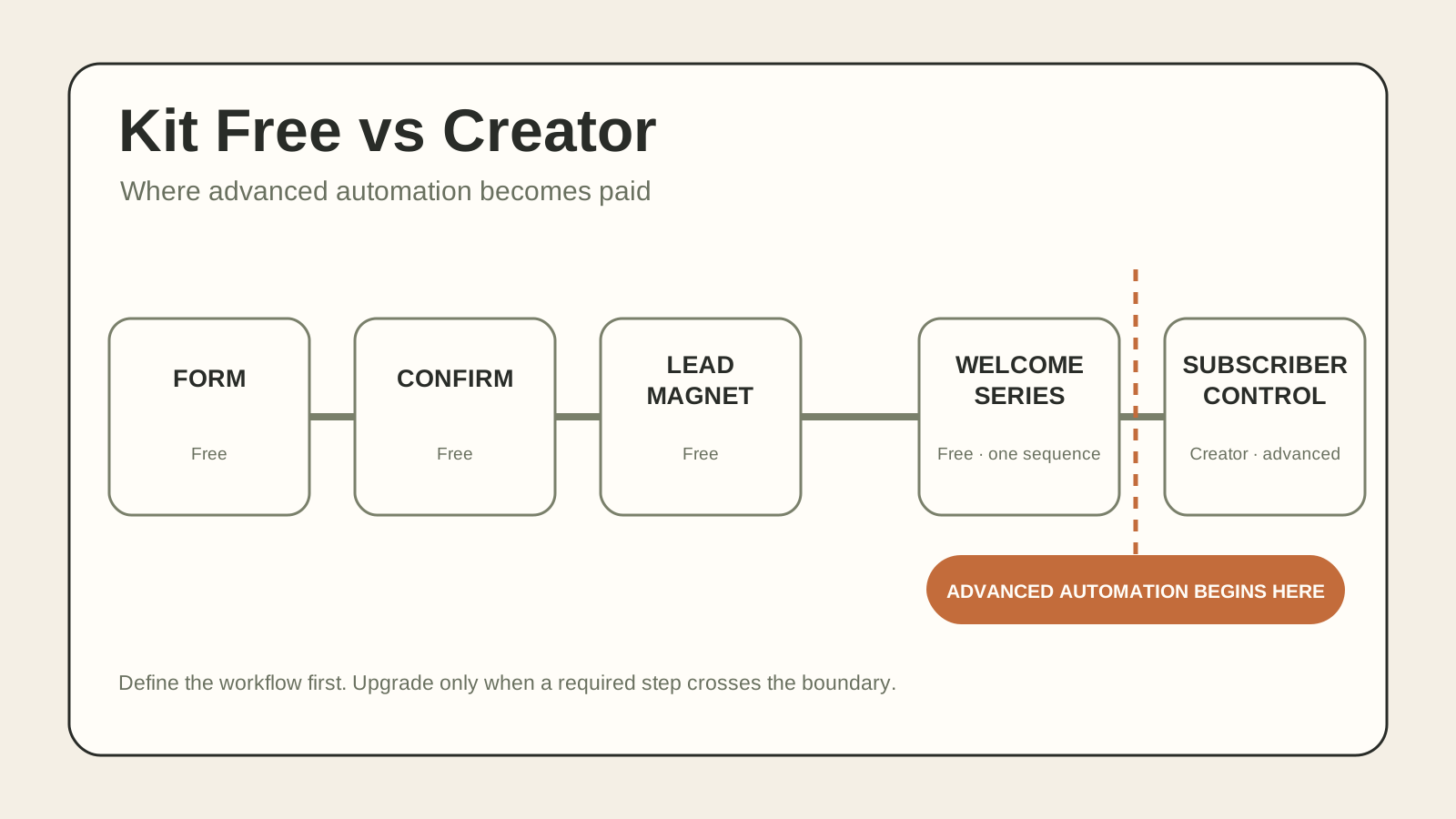
The important limit is workflow depth. Kit’s current Newsletter Plan help article documents one Email Sequence and one basic action-only Visual Automation. Paid Creator and Pro plans add unlimited sequences and more advanced automation capabilities, including event and condition steps and rules.
Short recommendation: Start with Kit Free if one form, an incentive email, one fixed welcome sequence and broadcasts cover the workflow. Choose Creator when you need several sequences, branching or behavior-based follow-up.
No affiliate link is included in this review. Read the site’s affiliate and editorial disclosure for the policy that applies if a verified relationship is added later.
What Kit Free includes now
Kit’s current pricing and Free-plan documentation list up to 10,000 email subscribers, unlimited forms and landing pages, unlimited broadcasts, tags and segments, digital products and subscriptions, broadcast A/B testing, free recommendations through the Creator Network and API access.
Broadcast: a one-off email sent at a chosen time. Sequence: a set of automated emails a subscriber receives in order. Kit’s current Newsletter Plan documentation includes one sequence; paid plans add unlimited sequences.
| Need | Free | Creator | Pro |
|---|---|---|---|
| Forms and landing pages | Yes | Yes | Yes |
| One-off email broadcasts | Yes | Yes | Yes |
| Tags and segments | Yes | Yes | Yes |
| Up to 10,000 subscribers | Yes | Paid tiers scale by list size | Paid tiers scale by list size |
| Email sequences | One | Unlimited | Unlimited |
| Visual automations | One basic action-only automation | Unlimited with advanced steps | Unlimited with advanced steps |
| Rules and RSS campaigns | No under current Free documentation | Yes | Yes |
| Advanced engagement and deliverability reporting | No | Limited compared with Pro | Yes |
| Unlimited users | No | No | Yes |
Official claim: These boundaries come from Kit’s live pricing page and current Free-plan help article.
Domsky analysis: Free can run one useful welcome path, but it is not an unlimited automation plan. The upgrade decision begins when the workflow exceeds that boundary.
The important distinction: confirmation email versus welcome sequence
Kit calls the first message attached to a form or landing page the confirmation email. It can ask the subscriber to confirm their address and can deliver a lead-magnet file after the click. That is not the same as a welcome sequence.
- Confirmation email: handles consent confirmation and, optionally, incentive delivery.
- Welcome email: introduces the newsletter or business after signup.
- Welcome sequence: two or more automated emails sent over time.
Kit says disabling the confirmation email also disables double opt-in. With double opt-in enabled, a subscriber must click the confirmation link before becoming confirmed. Kit recommends keeping this setting on by default.
For a simple lead magnet, one carefully written confirmation email may be enough at the beginning. It can explain what the reader requested and take them to the file, but it should not be described as a full welcome sequence.
The simple lead-magnet workflow
What Free can do
On Free, you can build the form or landing page, configure the confirmation email, deliver a file, organize subscribers, send broadcasts and run one fixed sequence through one basic action-only automation.
That can support a deliberately simple newsletter with one lead magnet, one audience, a clear confirmation message and one welcome path.
Where Creator becomes necessary
Upgrade pressure appears when the workflow needs more than one sequence or more than the basic action-only automation. Paid plans add unlimited sequences and advanced event, condition and rule functionality.
- more than one automated sequence;
- different follow-up sequences for different forms;
- rules that react to subscriber activity;
- several automation paths; or
- an RSS-based email campaign.
Do not pay for automation as an abstract benefit. Write the exact flow first. If you cannot name the second email, its delay and the reason it needs to be automatic, the paid plan may be premature.
What counts toward your subscriber limit
Kit’s subscriber-status documentation says only confirmed subscribers count toward billing and can be emailed through Kit. This includes cold subscribers that remain confirmed.
Unconfirmed subscribers have not completed the confirmation step. They do not count toward billing and cannot be emailed. Unsubscribed subscribers remain in the account with their historical data, but they do not count toward billing and cannot receive further Kit email.
- A high raw signup count is not necessarily the same as the billable list size.
- A confirmed but inactive list can still push the account into a higher subscriber tier.
List cleaning should be a considered editorial and data decision. Export a backup, define inactivity consistently and distinguish unsubscribing from deleting. Kit says deleting removes the subscriber and historical data, while unsubscribing retains history.
Price and upgrade triggers
Kit’s public pricing page displayed these US-dollar prices for up to 1,000 subscribers when checked on 26 September 2026.
| Plan | Displayed price | Billing note |
|---|---|---|
| Free | $0/month | Up to 10,000 subscribers under current plan terms |
| Creator | $33/month equivalent | $390 billed yearly; page says this saves $78 per year |
| Pro | $66/month equivalent | $790 billed yearly; page says this saves $158 per year |
- a documented need for an automated welcome sequence;
- more than one repeatable subscriber journey;
- rules or RSS campaigns that remove recurring manual work;
- a paid integration the workflow genuinely requires; or
- Pro-only reporting or collaboration that affects a real operating decision.
List growth alone is not a sufficient upgrade trigger while the current Free plan supports up to 10,000 subscribers.
Integrations, export and leaving later
Kit lists API access on the Free plan. Its app documentation says some apps are available on Free while others display an upgrade requirement. Check the exact integration before choosing a plan.
Kit documents CSV export for subscribers and filtered groups. A regular export provides a portable backup of the audience data the platform allows you to download.
- export the full subscriber list and open the CSV;
- export a tagged or filtered group;
- unsubscribe a test address and confirm that sending stops;
- distinguish unsubscribe from permanent deletion;
- record which fields, tags and timestamps appear; and
- confirm how an imported contact is treated before migration.
Documentation can establish that the controls exist. Only an account-level test can show whether the current interface and exported fields fit your process.
Practical limitations to test before launch
This review does not claim firsthand results. These checks remain part of Domsky’s pre-publication product test and should also form the reader’s launch checklist.
| Test | What to verify | Why it matters |
|---|---|---|
| Form submission | Success state, mobile usability and stored fields | Prevents a broken first step |
| Confirmation | Message arrives, sender is recognizable and link works | Confirms the consent path |
| Lead-magnet delivery | Correct file or page appears after the click | Prevents a poor first impression |
| Welcome flow | Correct message or paid sequence starts once | Catches duplicate or missing entry logic |
| Tagging | Expected tag appears and no unrelated tag is added | Keeps later targeting reliable |
| Unsubscribe | Test address stops receiving email | Checks a basic subscriber-control requirement |
| Export | CSV opens and contains the fields you need | Reduces platform lock-in |
| Mobile rendering | Form and email remain readable on a phone | Protects the common signup path |
Email placement can vary by sender setup, domain reputation, recipient provider and message content. A successful test to one inbox does not prove universal deliverability. This article makes no inbox-placement promise.
Which plan fits which creator
| Situation | Start with | Reason |
|---|---|---|
| New newsletter, one form, regular manual sends | Free | The included form, confirmation and broadcasts cover the workflow |
| One lead magnet, no multi-email follow-up yet | Free | Use the confirmation email for delivery and add broadcasts deliberately |
| One fixed welcome series after signup | Free | Current Newsletter Plan documentation includes one sequence and one basic automation |
| Several lead magnets with different follow-up paths | Creator | Multiple sequences and automation actions are the relevant value |
| Team members need access and advanced reporting | Pro | Pro adds unlimited users and deeper analytics/reporting |
| Newsletter-first media business comparing platforms | Compare first | Another platform may better match the operating model |
Domsky analysis: Most beginners should choose between Free and Creator. Pro should solve a named reporting or collaboration problem, not serve as a status upgrade.
When Kit is not the best fit
- several sequences or advanced branching are required but the paid price is outside the budget;
- a required integration is unavailable or requires an unwanted upgrade;
- the primary product is a publication and another newsletter-site or advertising model fits better;
- the team needs a traditional marketing suite with broader CRM functions; or
- another tool’s free plan includes the exact automation being planned.
Those are workflow mismatches, not evidence that Kit is generally bad. Compare Kit, MailerLite and beehiiv using the same subscriber count, billing cadence and required workflow.
Domsky recommendation
One fixed welcome path
Choose Free
Kit Free
Several subscriber journeys
Choose Creator
Kit Creator
Team and reporting needs
Choose Pro carefully
Kit Pro
The practical rule is simple: pay for the first required workflow that Free cannot run. Before committing, complete one full signup-to-unsubscribe test and export the resulting test record.
Before adding email software at all, use the lean solo-business stack guide to decide whether subscriber capture and planned email are current jobs or categories that can wait.
Common questions
Is Kit still ConvertKit?
Kit is the current product name; the company describes it as formerly ConvertKit. This page keeps the older /reviews/convertkit route so existing links do not need to change.
Is Kit really free for up to 10,000 subscribers?
Kit’s current Free-plan and pricing pages say yes, subject to current terms. The plan includes forms, landing pages, broadcasts, tagging and segmentation, but not every automation or app feature.
Can Kit Free send a welcome sequence?
Yes, within the current Newsletter Plan boundary: one Email Sequence and one basic action-only Visual Automation. Unlimited sequences and advanced automation require a paid plan.
Does the confirmation email count as a welcome email?
It can welcome the subscriber and deliver a file, but it is primarily the confirmation and incentive step. It is not the same as a timed multi-email welcome sequence.
Which subscribers count toward billing?
Kit says confirmed subscribers count toward billing and can be emailed. Unconfirmed and unsubscribed contacts do not count. Confirmed cold subscribers remain in the total.
Can I export my list?
Kit documents CSV exports for the subscriber list and subsets. Test the current export before launch to confirm that it contains the fields and organization you need.
Pricing, plan boundaries and workflow descriptions come from Kit’s official pages listed below. Domsky has not completed its controlled workflow test, so this review does not rate setup ease, delivery speed, inbox placement or support quality.
Sources and evidence limits
- Kit: Pricing and plans
- Kit Help Center: The Kit Free plan
- Kit Help Center: Visual Automations on the Newsletter Plan
- Kit Help Center: Creator vs Pro — choose the right plan
- Kit: Features
- Kit Help Center: The Confirmation Email
- Kit Help Center: The all-important double opt-in
- Kit Help Center: Grow your list with content upgrades
- Kit Help Center: Creating and sending an Email Sequence
- Kit Help Center: How to use Kit Visual Automations
- Kit Help Center: Visual Automations actions
- Kit Help Center: Subscriber profile page and status
- Kit Help Center: How to remove subscribers
- Kit Help Center: How to export subscribers
- Kit Help Center: Apps and integrations overview
- Kit Help Center: Kit API overview
- Kit: Affiliate Program
Continue reading
Related articles
A Lean Solo-Business Stack: What to Use, Keep and Skip
Three practical paths for choosing the smallest useful software stack without turning every category into a purchase.
ComparisonsKit vs MailerLite vs beehiiv: Choose for a Lead Magnet or a Newsletter Business
Choose an email platform by the subscriber journey it must complete, then compare free limits, automation boundaries and equal-size monthly prices.
ComparisonsMake vs Zapier for a Solo Business: Your First Three Automations
Choose an automation platform by the work it must complete. Compare plan boundaries, billing and recovery—and when native tools are enough.