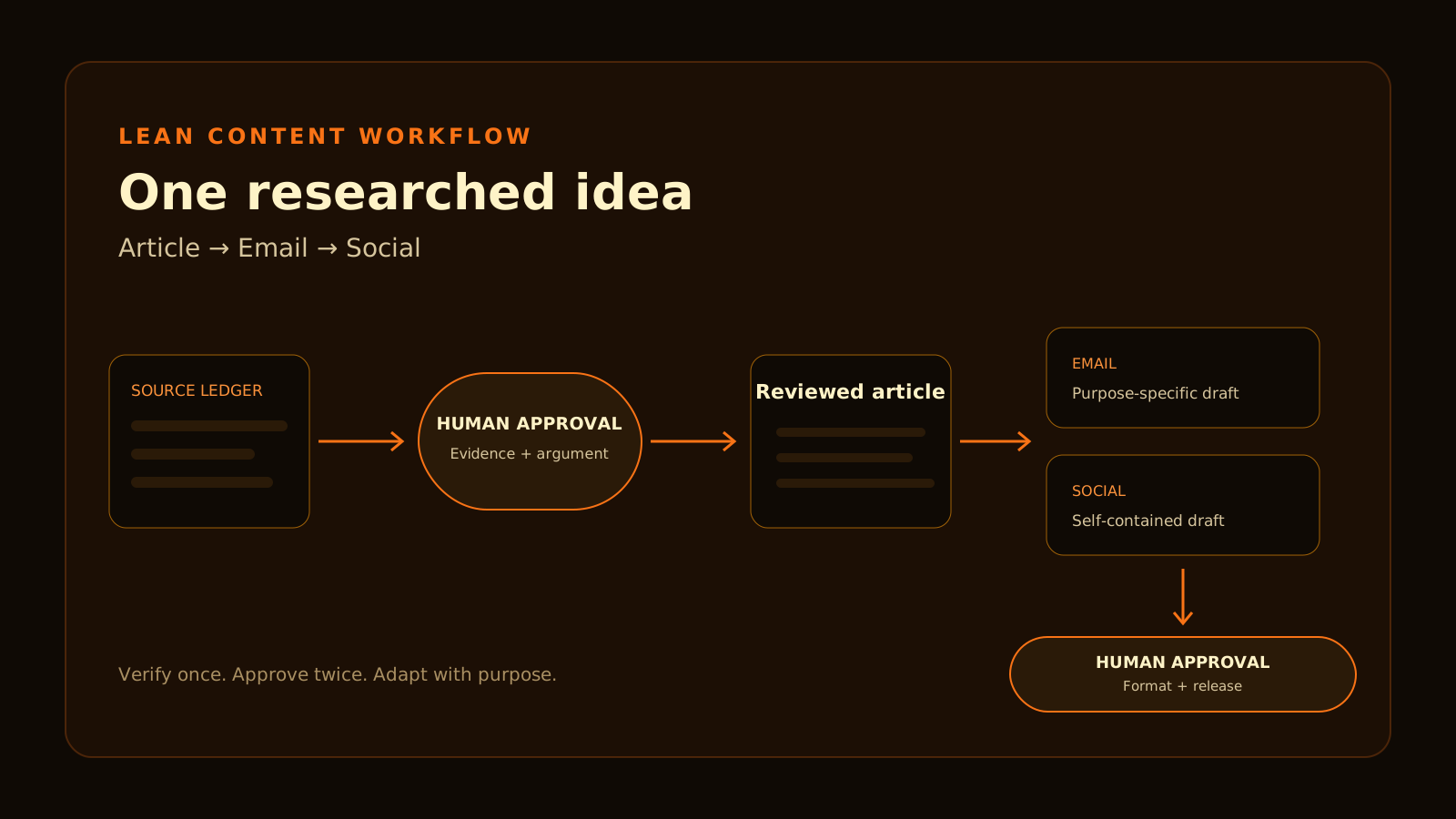
You do not need a different AI tool for research, writing, email and social media.
You need a controlled sequence of decisions:
The order matters. If you create every asset from an unverified idea, one weak claim spreads into three places. If you approve the evidence and article first, the derivatives inherit a stable factual core.
This guide demonstrates the process with one narrow question: Does a free email plan include the welcome sequence a beginner expects?
The finished outputs are a compact article, an email and a LinkedIn post. No automation or extra design subscription is required. When choosing the assistant, compare one assistant for your workflow instead of assembling a large overlapping stack.
The workflow in one view
| Stage | Input | Output | Human check | Evidence retained |
|---|---|---|---|---|
| 1. Brief | Audience and one question | Scope and three formats | Is the question useful and narrow? | Approved brief |
| 2. Research | Official sources | Source ledger and claim list | Does each claim have direct support? | URLs, dates and notes |
| 3. Argument | Claim list | Thesis, outline and exclusions | Is this the position Domsky wants to take? | Approved outline |
| 4. Article draft | Approved outline and ledger | Draft with source IDs | Are facts separated from analysis? | Versioned draft |
| 5. Review | Draft and sources | Corrected approved article | Any stale facts or unsupported certainty? | Correction log |
| 6. Adapt | Approved article | Email and LinkedIn post | Is each useful in its own context? | Derivative drafts |
| 7. Release check | All assets | Ready-to-schedule package | Are links, facts and formats correct? | Checklist and dates |
The assistant can help organize, draft and compress. The editor still chooses the question, approves the conclusion and decides what is safe to publish.
For the tools around this process, see the wider lean stack and add a category only when the workflow exposes a real gap.
Step 1 — Define one reader question and three outputs
Avoid prompts such as “make content about email tools.” They leave the assistant to decide the audience, scope, angle and facts.
Use the site’s Prompt Builder to structure a bounded prompt after the audience, question and exclusions are decided.
Three formats do not mean three independent arguments. The article explains the decision and preserves the evidence. The email surfaces one useful insight and sends the reader to the article. The LinkedIn post presents a self-contained observation rather than copying the article.
Step 2 — Build a source ledger before drafting
A source ledger is a small table connecting each publishable claim to the page that supports it.
| Claim ID | Draft claim | Primary source | Checked | Confidence / limitation |
|---|---|---|---|---|
| EX-C01 | Kit Newsletter Plan includes one sequence and one basic visual automation | Kit Help: Visual Automations on the Newsletter Plan | 2026-09-25 | Official and specific; pricing presentation is less clear |
| EX-C02 | MailerLite Free allows 250 active subscribers, 2,500 monthly sends and three automations | MailerLite Free-plan update and pricing | 2026-09-25 | Official; exceeding limits pauses relevant activity |
| EX-C03 | beehiiv has one welcome email on all plans; multi-step automation is paid | beehiiv Help: welcome email vs welcome automation | 2026-09-25 | Official; not a delivery-performance claim |
| EX-C04 | LinkedIn posts currently allow 3,000 characters | LinkedIn Help | 2026-09-25 | Official format limit; may change |
The ledger should contain only claims the article needs. Do not collect dozens of sources because they are available.
- Is the sentence a fact, an official product claim, an external report or editorial analysis?
- Does the source directly support the sentence?
- Is the source current enough for the risk?
- Does another official page conflict with it?
- What would make the claim expire?
If the source does not answer the exact question, narrow the sentence or leave it out.
Step 3 — Approve the argument and boundaries
Research provides facts. It does not choose the editorial conclusion.
“Free” does not tell you whether the plan fits. Map the required welcome workflow, then compare the exact sequence and automation limits.
- Do not rank deliverability without a controlled test.
- Do not infer ease of use from a feature table.
- Do not add a universal winner.
- Do not turn the workflow tutorial into a product comparison.
- Do not add productivity or time-saving claims without a log.
Step 4 — Draft the article with source IDs
Draft only after the argument is approved. Keep claim IDs beside factual sentences until the evidence review is complete.
Demonstration article
A free email plan can support a lead magnet without supporting every welcome workflow.
One welcome email, a fixed sequence and a branching automation are different requirements. Current provider documentation shows three different boundaries.
- Kit’s free Newsletter Plan includes one Email Sequence and one basic action-only Visual Automation. Paid plans add unlimited sequences and advanced automation.
- MailerLite Free includes three active automations, but its current limits are 250 active subscribers and 2,500 monthly sends.
- beehiiv provides one standalone welcome email on all plans; multi-step welcome automations require a paid plan.
These facts do not identify a universal winner. They show why the required journey should be written before comparing subscriber allowances or prices.
For the full decision context, compare email plans by workflow. If Kit is already the likely choice, check Kit’s current workflow limits.
Step 5 — Run an evidence and usefulness review
Evidence pass
- Open every cited page.
- Check that the sentence matches the source’s scope and plan.
- Search for a more specific or newer official page.
- Resolve conflicts before removing claim IDs.
- Replace broad wording with the narrow supported claim.
- Remove claim IDs only after approval.
Usefulness pass
- Does the introduction explain why the reader should care?
- Does each section support the decision?
- Is advice distinct from vendor documentation?
- Can a beginner understand every term?
- Does the article say what not to do?
- Is the next action concrete?
Voice pass
- Remove sales language and false urgency.
- Replace generic AI phrases with specific decisions.
- Vary sentence structure without adding decoration.
- Keep the strongest caveat beside the claim it limits.
- Do not pretend the writer used a product when the evidence is documentation.
Worked correction — what changed and why
The demonstration found a real source conflict.
| Working draft | Evidence found | Corrected version | Downstream impact |
|---|---|---|---|
| Kit Free does not include sequences or visual automation. | Kit’s updated Newsletter Plan help article includes one Email Sequence and one basic Visual Automation. | Kit Free includes one sequence and one basic action-only automation; paid plans add unlimited sequences and advanced automation. | DCE-05 and Kit free-plan summaries were corrected before release. |
| beehiiv Free cannot automate a welcome. | Official help distinguishes one automatic welcome email from multi-step Automations. | Launch can send one welcome email; multi-step flows require a paid plan. | Keep welcome email and welcome automation separate. |
| MailerLite Free includes automation. | Correct but incomplete: limits are three automations, 250 active subscribers and 2,500 sends. | State all three boundaries together. | Avoid a misleading feature-only recommendation. |
The lesson is not that documentation is always consistent. A claim must remain attached to the most specific current source, and conflicts must be visible instead of averaged into a confident sentence.
Step 6 — Adapt the approved article
Do not paste the article into every channel. Preserve the approved facts but change the purpose, opening and call to action.
Email adaptation
Subject: Does your free email plan include the sequence you need?
Preview text: “Free” describes the price, not the workflow.
Choosing an email platform by subscriber allowance alone can hide the limit that matters most. One welcome email is not the same as a multi-email sequence, and a fixed sequence is not the same as a branching automation.
The useful question is not “Which free plan gives me the most?” It is “What must happen after someone subscribes?” Map that journey first. Then check sequence, subscriber and send limits before building the form.
Before sending, use the verified canonical link to the email-platform comparison, add the required footer and disclosure, and test the message in the selected email platform. This draft is not authorization to send it.
LinkedIn adaptation
LinkedIn currently documents a 3,000-character limit. The demonstration stays below it and works as a self-contained observation rather than a clipped article introduction.
“Free plan” is not a useful email-platform requirement. The real question is what must happen after someone subscribes: one welcome email, a fixed multi-email sequence, or a branching automation based on behavior?
The post then gives the three documented plan boundaries, the subscriber-journey checklist and the instruction to choose the lowest plan that completes it. Before publishing, link to the canonical email-platform comparison, recheck every plan fact and keep hashtags limited to those the editor considers useful.
Step 7 — Run format-specific checks and schedule manually
Article check
- H1, title tag and meta description match the search intent.
- Sources support each factual claim.
- Internal links point to ready pages.
- Tables work on mobile and have headers.
- Disclosure, author and dates are accurate.
- Featured image and alt text are present.
Email check
- Subject and preview text work together.
- One primary action is clear.
- Every link uses the intended destination.
- Required sender details, unsubscribe and disclosure are present.
- A test email renders correctly.
- No unsupported personalization or performance promise was introduced.
LinkedIn check
- The post makes sense without clicking.
- It stays within the current format limit.
- Line breaks remain readable on mobile.
- Claims match the approved article.
- The article link uses the approved canonical URL.
- No automated posting occurs without separate authorization.
Manual publishing is acceptable. Use the Content Calendar to plan the next publishing date after the assets pass review. Automation becomes useful only when the same approved handoff creates a measurable bottleneck.
Review the workflow before adding tools
- one assistant for organization, drafting and adaptation;
- one document editor for approval and version history;
- a browser for primary-source verification;
- the website repository for the article;
- an email platform only when there is a real list; and
- the native social platform for final posting.
Do not add an automation platform merely to move an unapproved draft between tools. The slow step should be editorial judgment, not copying text.
When a repeated bottleneck appears, document the repeated action, its frequency, the error it creates, the review that must remain manual and whether automation would reduce work without removing the approval gate.
Compare Make and Zapier for an optional task and reminder handoff after content approval.
Common questions
Should research finish before drafting?
Finish the evidence needed for the approved scope. New questions may appear during drafting, but they should return to research as explicit gaps rather than being answered from memory.
Can I reuse the same text in the email and LinkedIn post?
Reuse approved facts and the core conclusion. Rewrite the opening, structure and action for each context. Identical copy usually ignores why the reader encountered it.
Do I need an automation tool?
No. A solo publisher can run this workflow with one assistant, an editor and manual publishing. Add automation after a repeated, measurable handoff problem appears.
What if official sources disagree?
Prefer the most specific and current documentation, record the conflict and narrow the claim. If the conflict changes a buying decision, verify inside the product or with the provider before publishing a definitive recommendation.
Evidence and limitations
The example assets in this article were created as one documented editorial run. They demonstrate the process and one real correction. They do not establish average time savings, output quality across topics, social reach, email engagement or product usability.
The email and LinkedIn post are drafts. They were not sent or posted. Product facts and platform limits should be rechecked before publication, and distribution requires a separate authorized action.
Official sources
Continue reading
Related articles
A Lean Solo-Business Stack: What to Use, Keep and Skip
Three practical paths for choosing the smallest useful software stack without turning every category into a purchase.
ComparisonsKit vs MailerLite vs beehiiv: Choose for a Lead Magnet or a Newsletter Business
Choose an email platform by the subscriber journey it must complete, then compare free limits, automation boundaries and equal-size monthly prices.
ComparisonsChatGPT vs Claude vs Gemini: Which One Should a Solo Business Pay For?
ChatGPT, Claude and Gemini overlap more than their marketing suggests. Compare free and paid plans by tasks, limits, integrations and incremental value.
Email MarketingKit Review for a Solo Creator: Free-Plan Limits, Welcome Emails and Upgrade Triggers
Kit Free includes one email sequence and one basic visual automation. See where Creator becomes necessary for unlimited or advanced workflows.